


MyShake Earthquake Alerts
3.81.32K Reviews
App Specs
- Version
- 3.1.40
- Updated On
- License
- Free
- Downloads
- 1,000,000+
- Developer
- UC Berkeley Seismological Laboratory
- Categories
- Weather
- Platform
- Android, iOS
Screenshots
 Analysis by AppCompare
When an earthquake is possible, an alert can be useful, but only if you understand what it can and cannot do. I look at MyShake as a practical extra layer of awareness rather than a substitute for preparation or official guidance. Its focus is earthquake information, and that makes it different from the broad forecasts and storm notifications most people already get from a standard weather app.
Trust starts with knowing what the app is for
MyShake is a free weather app developed by the UC Berkeley Seismological Laboratory. It has an average rating of 3.8 from around 5,200 ratings, and more than a million installs. Those figures suggest a widely used tool, but they are not a guarantee that an alert will arrive in every situation. I would treat it as one source of useful information, not as a promise of warning time or a replacement for knowing what to do when shaking begins.
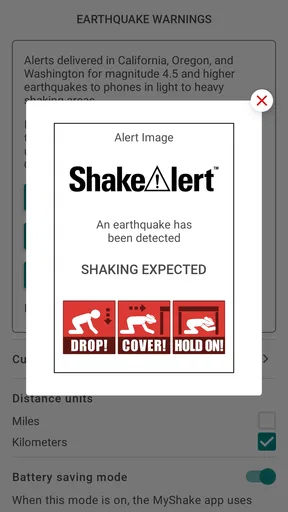
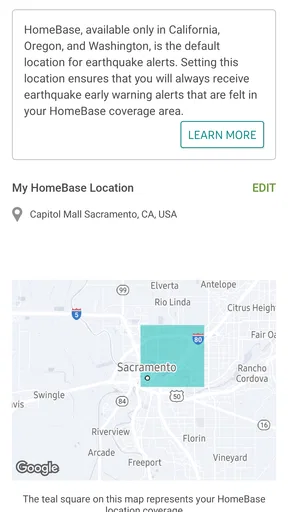
The app is intended to provide earthquake early-warning alerts in California, Oregon, and Washington. That regional focus matters: it is most relevant to people who live, work, or regularly travel in those states. If you are elsewhere, its broader earthquake information may still interest you, but I would not choose it as a dependable local warning service for a region outside that stated coverage.
Setup choices that affect the experience
When I first open MyShake Earthquake Alerts, the important practical decision is whether to allow location access and notifications. Those choices are connected to the app’s central purpose: a location-aware warning is more useful than a general notice, and an alert cannot help if notifications are silenced. I would review both choices deliberately during setup rather than tapping through without thinking.
That does not mean every user should grant every permission automatically. Consider how you use your phone, whether you keep notifications enabled, and whether you are comfortable with location being used for this kind of service. Check the permission controls on your device if you later want to change your choice. I can describe those visible setup decisions, but I would not infer broader data-handling practices from them.
If you depend on alerts, check that the app’s notifications are allowed in the phone’s settings and that your usual focus or quiet modes will not hide them at the times you care about. This is a useful habit for any alert tool, and especially for one whose value depends on reaching you promptly. A quick settings check after installation can prevent a false sense of readiness.
What the maps and reports add
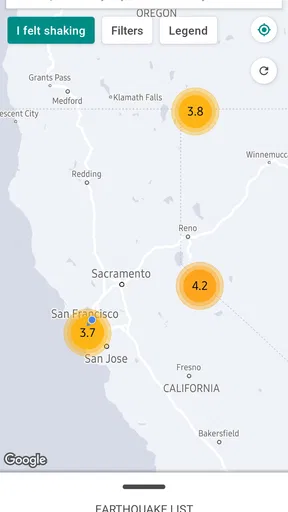
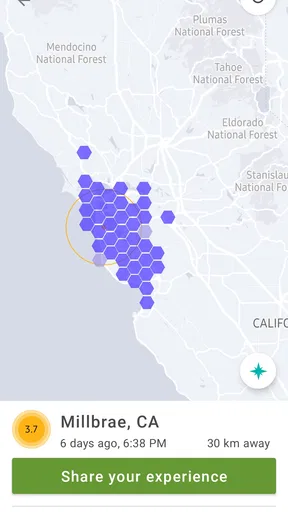
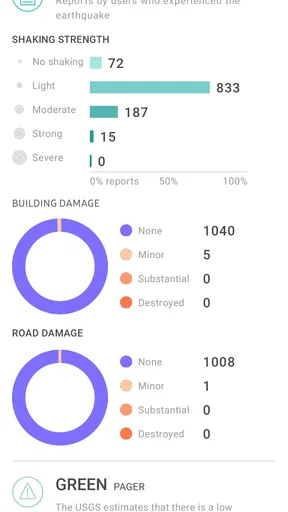
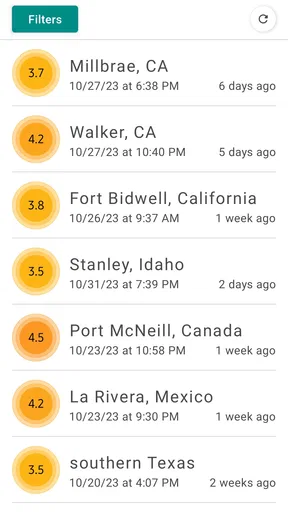
The app also presents earthquake information beyond a single alert. Its map lets me look across regions and see recent seismic activity, while community reports give users a way to share what they experienced. These features make the app more useful after a notification: they offer context and a way to understand that other people may have felt the same event.
Worth Reading Before You Choose

EA SPORTS FC Mobile 26 Is a Bigger Football Game, but It Takes Time

Flipboard Shows What News Apps Must Do Beyond the Feed

Switching to Android Auto Means Rethinking Your Driving Routine

Google Calendar Makes a Crowded Week Easier to Manage

Ludo King Makes the Most of the Minutes Between Plans

Baby Panda World Brings Quick Play to Modern Phones, but Its Game Library Feels Busy
I would use the map as a way to explore and orient myself, not as a substitute for an urgent warning. If a notification arrives, the priority is to follow appropriate safety steps rather than zoom around the map for details. Community reports can add a human perspective, but an individual report is not the same thing as an official assessment. That distinction helps keep an interesting feature from being mistaken for a definitive source.
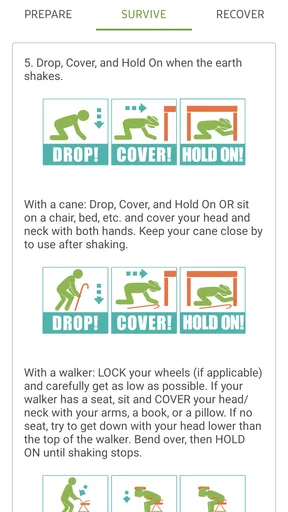
The safety guidance is another useful part of the experience. Reading basic advice before an emergency is more valuable than trying to learn it while distracted or worried. I would take a few minutes to review it when calm, then think about how it applies at home, at work, or in a place where I spend a lot of time. The app can help make preparation more accessible, but the benefit comes from acting on that information in advance.
Using MyShake in everyday life
A realistic use case is someone who lives in California and commutes to work across the region. They can keep the app installed, allow the relevant notifications, and treat an alert as a cue to follow safety guidance rather than as a reason to stop and investigate the screen. At a later, calmer moment, the map can help them see where activity was reported. This is a sensible workflow: make the alert reachable, respond first, and use the extra information afterward.
For a household, I would also talk through what everyone should do if a warning appears or shaking starts. An app cannot make that plan on your behalf. Agreeing on a simple response ahead of time can make the notification more actionable, particularly if family members are in different rooms or away from home. That preparation is useful whether or not a phone is nearby when an earthquake occurs.
MyShake suits people who want earthquake-specific awareness and are in the regions the app is designed to serve. It may also appeal to curious users who like following seismic activity or learning about safety. It is less suitable as a stand-alone choice for someone seeking a general weather forecast, a full emergency-management toolkit, or a local warning system for an area beyond its stated coverage.
How it differs from a standard weather app
Most everyday weather apps are built around conditions such as rain, temperature, and wind. MyShake has a narrower purpose: earthquake alerts and related information. That specialization is its main advantage for the right user, because earthquake context is not just another forecast tile. The trade-off is that it does not replace the broad day-to-day weather information people use to plan outdoor activities.
I would keep whichever general weather app I already rely on for routine forecasts and use MyShake for its distinct earthquake focus. Adding a specialist app only makes sense if its coverage and notifications fit your needs. If you live outside California, Oregon, and Washington, or want one app to handle every kind of weather alert, your usual local weather or emergency-information service may be a better primary choice.
Reliability, limits, and sensible expectations
For an alert app, reliability is about more than whether the interface opens smoothly. Phone connectivity, notification settings, and location choices can all affect what reaches you and when. I would not plan around the assumption that every event will produce a warning with a particular amount of lead time. The most responsible way to use any early-warning tool is to value a notification when it arrives while remaining prepared for situations where it does not.
That is also why I would avoid treating the app’s map as a live safety instruction. A map can help you understand reported activity, but in a stressful moment it is easy to spend time seeking extra detail when the useful action is to follow established safety guidance. Review the safety tips before you need them, and use the map afterward when you are able to do so calmly.
My experience with the app’s design is straightforward: its central choices are understandable, and the earthquake-specific purpose is easy to grasp. Still, “easy to use” does not mean “set it and forget it.” I would revisit notification and location settings after changing phones or adjusting system preferences. A quick check is a low-effort way to make sure the setup still matches how you want the app to work.
Who should install it, and who may not need it
If you spend time in California, Oregon, or Washington and want an additional way to receive earthquake information, this is a reasonable app to try. The educational material and map can be worthwhile even for someone who has never received an alert. Its free price removes a purchase decision, while the Everyone content rating makes it suitable for a broad audience; the useful question is whether the coverage and permissions suit you.
I would be more cautious about recommending it to someone who expects a comprehensive emergency service or assumes it will provide the same kind of warning everywhere. A traveler passing through the covered states may find it useful while there, but should not mistake a regional tool for universal coverage. Someone who does not want location-based functionality or phone notifications may also find that the features central to the app are less useful to them.
The app is version 3.1.38 and requires Android 9 or later. Before installing on an older Android device, I would check the operating-system requirement rather than assume it will run. For iOS users, I would likewise check the current compatibility details on their device’s app store before relying on it. Either way, I would install and test the notification setup while there is time to adjust it, not in the middle of an urgent situation.
Questions worth settling before you rely on it
One practical question is whether the app is useful outside its core region. The clearest answer is that its early-warning purpose is for California, Oregon, and Washington; people elsewhere should not assume they will receive the same local warning service. Another is whether location access is necessary for the experience. Location is part of the setup for timely alerts, so I would consider the permission in light of the feature I want and make any changes through the phone’s controls.
People also often wonder whether alerts alone are enough preparation. I would say no: alerts can draw attention to a situation, while advance knowledge of safety steps and a simple household plan make it easier to respond. And if a notification does not arrive, that should not be taken as proof that there is no danger. The app is an additional source of awareness, not a guarantee.
Finally, the map and community reports are best treated as context rather than commands. They can help satisfy curiosity or give a sense of what others experienced, but the immediate response should be guided by safety advice. Keeping those roles separate makes the app more useful and helps avoid checking extra details at the wrong time.
A cautious recommendation
MyShake earns a place on my phone when I want earthquake-focused alerts and information in the states it serves. I particularly value the combination of notifications, an activity map, safety guidance, and community reports, because each helps in a different way: awareness, context, preparation, and shared experience. The most useful approach is to configure the choices thoughtfully and read the guidance before an emergency.
I would not promise that it can prevent harm or deliver a warning for every earthquake. I also would not install it as a replacement for ordinary weather forecasts or local emergency information. But for someone in its intended region who understands those limits, it is a practical free tool worth considering. In my view, it works best as one part of a larger habit of staying informed and knowing how to respond.
Have you ever felt that little jolt and wondered if it was just your imagination or an actual earthquake? Well, you’re not alone. I’ve been there too, and that's where MyShake Earthquake Alerts comes in. This app has been a game-changer for me, and I’d love to share my experience with you.
Getting Started with MyShake Earthquake Alerts
Downloading MyShake Earthquake Alerts was a breeze. Available on both Android and iOS, it took just a few taps to get it up and running. Right off the bat, the app greeted me with a sleek, intuitive interface that made navigation a piece of cake. No tech wizardry needed here, folks.
Once inside, I was prompted to enable location services and notifications. This is crucial as the app uses your location to provide timely alerts. Trust me, you don't want to miss these notifications, especially if you live in an area prone to seismic activity.
Diving into the Features
Now, let’s talk features. The app isn’t just about alerting you to earthquakes; it’s a whole suite of tools designed to keep you informed and prepared.
- Real-time Alerts: The app sends out rapid alerts when an earthquake is detected nearby. I’ve received notifications within seconds of seismic activity, giving me precious moments to duck and cover.
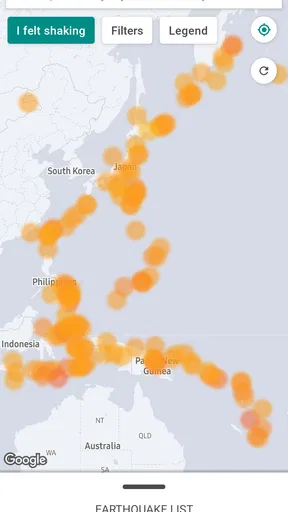
- Earthquake Map: This feature displays recent earthquakes worldwide. I find it fascinating to see the global seismic activity at a glance, and it can be quite the conversation starter.
- Safety Tips: MyShake offers practical tips on what to do before, during, and after an earthquake. It’s like having an earthquake survival guide right in your pocket.
- Community Reports: Users can report their experiences with earthquakes, providing valuable data to the community.
One of my favorite features is the interactive map. You can zoom in and out to see the seismic activity across different regions. It’s like having a bird’s-eye view of the earth’s quirks.
Performance and Reliability
In terms of performance, MyShake has been rock solid. I haven’t experienced any crashes or glitches, which is crucial for an app that deals with something as serious as earthquake alerts. The alerts are timely, and the information is accurate. I feel a sense of security knowing that I have such a reliable tool at my fingertips.
Battery usage is always a concern with location-based apps, but MyShake is surprisingly efficient. I didn’t notice any significant drain, which is a huge plus for those of us who are always battling a low battery.
Why You Should Try It
If you live in an earthquake-prone area, MyShake Earthquake Alerts is a must-have. Even if you’re not in such a zone, the educational value and peace of mind it offers are worth it. It’s not just about alerts; it’s about being prepared and informed.
The app is backed by scientific research from the Berkeley Seismological Laboratory, which adds an extra layer of trust. It’s comforting to know that this isn’t just another app but a tool backed by experts in the field.
In conclusion, MyShake has become an essential part of my daily routine. It’s easy to use, reliable, and packed with features that go beyond simple alerts. Whether it’s for personal safety or just out of curiosity about our ever-moving planet, this app is worth every megabyte of space on your phone.
So, if you haven’t already, give MyShake a try. Download it, enable notifications, and rest easy knowing you’ve got a little extra help in riding out those tectonic shifts. Stay safe, everyone!
Pros
- Timely earthquake alerts and notifications.
- User-friendly interface with easy navigation.
- Customizable alert settings for local areas.
- Detailed earthquake information and history.
- Community feedback feature for real-time data.
Cons
- Requires constant internet connection.
- Battery consumption can be high.
- Limited offline functionality.
- Occasional false alerts reported.
- Interface may appear cluttered to some users.
FAQs for MyShake Earthquake Alerts
What is MyShake Earthquake Alerts and how does it work?
MyShake Earthquake Alerts is a mobile app designed to provide real-time earthquake alerts and safety information. It uses a network of sensors in smartphones to detect seismic activity, offering users early warnings and crucial safety tips. By combining data from multiple devices, it enhances the accuracy of earthquake detection and notification.
How accurate are the earthquake alerts provided by MyShake?
While MyShake strives for high accuracy, the precision of alerts can vary based on factors like the density of active users and location. The app uses a network of sensors in participating smartphones to detect seismic activity, which means accuracy improves as more users contribute data. It’s a valuable tool but should be used alongside other safety measures.
Is MyShake Earthquake Alerts free to use, and are there any in-app purchases?
Yes, MyShake Earthquake Alerts is free to download and use on both Android and iOS platforms. The app does not have in-app purchases, making it accessible to anyone interested in receiving seismic alerts and safety tips without any additional costs.
Does MyShake work offline or require an internet connection?
MyShake requires an internet connection to receive real-time earthquake alerts and updates. However, some features, like viewing safety tips or past data, may be accessible offline. It’s recommended to have a stable internet connection to fully benefit from the app’s real-time alert capabilities.
Can MyShake Earthquake Alerts be customized for specific locations?
Yes, users can customize MyShake to receive alerts for specific regions by setting their preferred locations. This ensures that they receive relevant notifications tailored to areas they are concerned about. Customization makes it a flexible tool for those living in or traveling to earthquake-prone areas.


